Administrator
As the administrator you prepare the system before registration opens, give the countries and the staff their accounts, and handle the exceptions during registration: special dates, pay on arrival, withdrawn submissions and withdrawn countries. You can also see everything the other staff roles see.
Your part of the cycle
- Before registration: set the stage dates and the bank-transfer switch, and create the staff accounts (reviewers, finance, receptionists). See Registration settings and staff accounts.
- Open the doors: create the country accounts and send them to the representatives. See Country accounts.
- During registration: give a country its own dates, enable pay on arrival, apply exemptions or issue invoices when the reviewer is not available, return a submitted stage to a representative, or record a country's withdrawal. See Country operations.
- Throughout: follow the countries on the dashboards, country pages and timelines, and open embassy letters. See Monitoring.
- Reports: run any of the 16 reports and export them to Excel. See Reports.
Before you: nothing; you start the cycle. After you: each representative sets a password from the welcome e-mail, signs in and fills stage 1 (see Stage 1).
Signing in
Sign in on the administration portal with your e-mail address and password. See Getting started.
Your menu
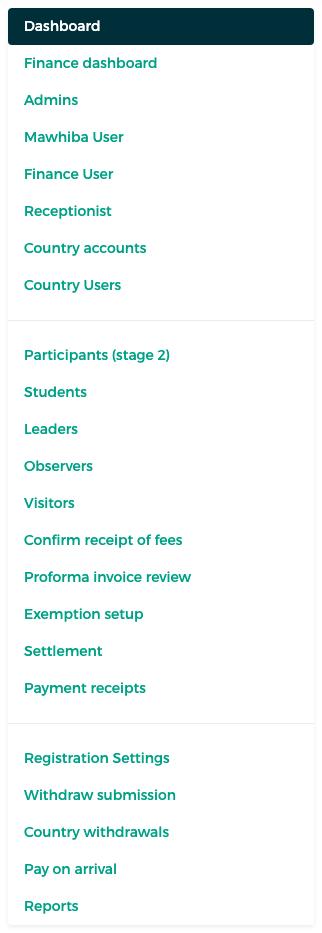
| Menu item | Purpose | Page |
|---|---|---|
| Dashboard | Progress of every country | Monitoring |
| Finance dashboard | Fees, payments and payment status per country | Monitoring |
| Admins, Mawhiba User, Finance User, Receptionist | Staff accounts per role | Setup |
| Country accounts | Create and send the representatives' accounts | Country accounts |
| Country Users | The representatives, with per-country settings | Country accounts |
| Participants (stage 2), Students, Leaders, Observers, Visitors | Participant lists and review | Reviewing participants |
| Confirm receipt of fees | Confirm bank transfers and payments on arrival | Finance – confirming payments |
| Proforma invoice review, Exemption setup | Review, exempt and issue invoices | Proforma invoices and exemptions |
| Settlement | Settlement claims for the rest of a transfer | Finance – settlement claims |
| Payment receipts | All receipts | Finance – receipts |
| Registration Settings | Stage dates and the bank-transfer switch | Setup |
| Withdraw submission, Country withdrawals, Pay on arrival | Exceptions per country | Country operations |
| Reports | The 16 reports | Reports |
Shared screens
Where you use the same screen as the reviewer or finance, this manual describes it once, in that role's chapter, and links to it.