Reference
This page is for all roles. It lists the statuses you see in the system, explains the words used, answers common questions and lists the e-mails the system sends.
Statuses
Stage status
Shown on the stage cards of the representative dashboard and on the staff dashboards.
| Status | Meaning |
|---|---|
| Not started | Nothing has been saved in this stage yet. |
| In progress | The stage has been started but is not complete, or a participant was returned for correction. |
| Submitted | The representative has submitted the stage. It is locked for the representative. |
| Open (small tag next to the dates) | Today is between the stage's start and end dates, so the stage can be filled in and submitted. After the end date, only what the organisers send back (a withdrawn submission or a returned participant) can be corrected and resubmitted. |
The badge at the top of the representative dashboard summarises the country's position, for example Stage 1 not started, Stage 2 in progress, Stage 3 not started or Registration completed.
Participant status (stage 2)
| Status | Meaning | Who acts next |
|---|---|---|
| Pending | Saved as a draft, not yet submitted. | Representative: complete and submit. |
| Data under review | Submitted, waiting for the reviewer. | Reviewer: approve or return. |
| Returned | The reviewer sent it back with a note. | Representative: correct the passport copy or photo and resubmit, also after the stage end date. |
| Approved | The reviewer accepted the data. It can no longer be edited. | Nobody. Remove and replace the member if something changes. |
A Pending participant with a Submission withdrawn badge was withdrawn by the administrator. The representative can correct and resubmit it, also after the stage end date.
Proforma invoice status
| Status | Meaning |
|---|---|
| Draft | The representative is preparing the invoices. They can still be changed, split and removed. |
| Pending review | Sent to the reviewer. Nobody can change it while it is reviewed. |
| Returned for changes | The reviewer sent the invoices back with a note. The representative can edit them again and resubmit. |
| Issued | The reviewer (or administrator) issued the invoice. Its amount is final and it can be paid. |
| Exempt | An exemption brought the invoice to $0. It is closed and there is nothing to pay. |
| Awaiting confirmation | The representative sent bank transfer details or committed to pay on arrival. Finance must confirm the money. |
| Partially paid | Finance confirmed part of the amount. The rest is still due. |
| Paid | The full amount was received. A receipt is issued and the tax invoice is produced. |
Payment method label
Each issued invoice also shows the chosen method: No payment method yet, Online, Bank transfer or On Arrival.
Country payment status
| Status | Meaning |
|---|---|
| Unpaid | No money has been received yet. |
| Partially paid | Some money has been received, but not every invoice is paid. |
| Fully paid | Every invoice is paid (or exempt). |
On the finance dashboard and in the payment reports, staff see the same idea with these names: Full, Partial, Zero, Exempt (every invoice closed as exempt) and Not invoiced (no invoice issued yet).
Settlement claim status
| Status | Meaning |
|---|---|
| Claim awaiting payment | Finance has sent the claim. The amount is collected when the delegation arrives. |
| Collected | Finance or the receptionist has recorded the payment (POS terminal or cash). The invoice becomes Paid. |
Glossary
| Term | Meaning |
|---|---|
| Country representative | The team coordinator of a country, who registers the delegation in the country portal. Signs in with the country code. |
| Country code | The three-letter code of a country, for example JOR. It is the representative's user name and the start of every participant code (JOR-S-01). |
| Stage 1, 2, 3 | The three parts of registration: 1 counts, 2 participant data, 3 travel. Each has its own dates. |
| Student, leader | The competing students and their team leaders. Together they form the team package. |
| Observer | An adult who accompanies the team as an observer. Billed per person. |
| Visitor | A guest who accompanies the delegation. Billed per person. |
| Team package | One fixed price for all students and leaders of a country together. It is always one line on one invoice and is never split. |
| Single room | A room for one person, for a leader, observer or visitor. Charged per room. Every single room chosen in stage 1 must be assigned to a person in stage 2. Students never get a single room. |
| Fee estimate | The amount the system calculates in stage 1 from the counts. It is for information only. |
| Invoice label | Every invoice is shown as Invoice 1 (No. 2). The first number is the order of the invoice within your country (first, second, third invoice). The No. is the invoice's reference number in the system: quote it when you contact Mawhiba about an invoice or a payment. |
| Proforma invoice | The draft invoice that the representative prepares (and can split) and sends to the reviewer. Once issued, it can be paid. |
| Split invoice | Sharing the country's bill over several invoices, for example one per payer. Observers, visitors and single rooms can be moved between invoices; the team package cannot. |
| Billing data (invoice data) | The name, address, tax number, e-mail and phone of the payer of an invoice. Each invoice has its own. |
| Issue (an invoice) | The reviewer's or administrator's action that makes an invoice final and payable. |
| Exemption | A reduction of an invoice granted by Mawhiba, labelled Discount or Support. Both work the same way. It is applied to one invoice before it is issued. An invoice reduced to $0 is closed as exempt. |
| Pay on arrival | Paying an invoice when the delegation arrives in Saudi Arabia, by POS terminal or cash. Available only for countries the administrator has allowed. |
| POS terminal | The card payment machine used to collect payments on arrival. |
| Partial payment | When finance confirms less than the full invoice amount. The invoice is Partially paid until the rest is received. |
| Settlement claim | A request from finance to pay the remaining amount of a partly paid invoice on arrival. The receptionist or finance collects it. |
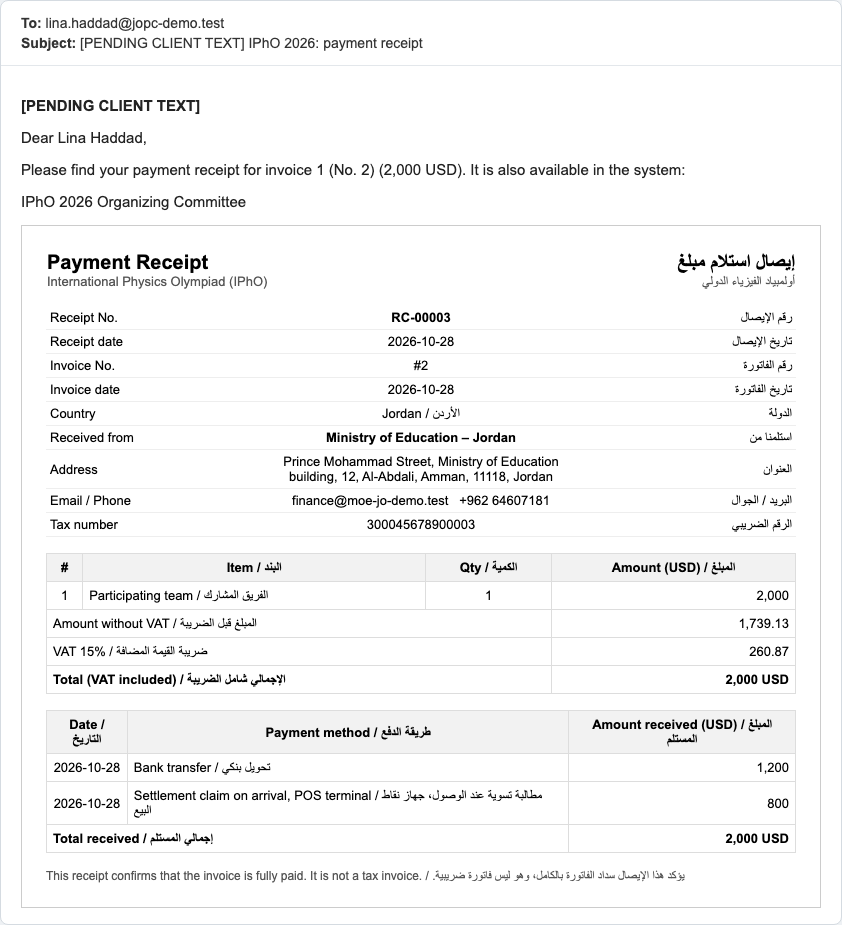
| Payment receipt | A bilingual document confirming that one invoice is fully paid. Issued per invoice and e-mailed. It is not a tax invoice. |
| Tax invoice | The official VAT invoice, produced when an invoice is fully paid, using that invoice's billing data. |
| VAT | Value added tax, 15 %. All prices already include it. |
| Embassy letter | A letter to the Saudi embassy or consulate supporting the visa applications of approved members. Group or single, in English or Arabic. |
| Withdraw submission | An administrator action that reopens a submitted stage for a country so the representative can correct and resubmit it. Possible once the stage has started, also after its end date. |
| Country withdrawal | An administrator action recording that a country no longer takes part. The country is hidden from lists, dashboards and reports; its financial records are kept; fees are not refunded. It can be reactivated. |
| Timeline | The history of a country: every action, who did it and when. Seen by staff. |
Frequently asked questions
1. I did not receive the welcome e-mail, or the link has expired. What do I do? On the login page, click Forgot Password and type your e-mail address. If you still receive nothing, check your spam folder, then contact the organisers: an administrator can send your account again.
2. Can I change the numbers in stage 1 after I submitted it? Not by yourself. Contact the organisers: an administrator can withdraw your submission so you can edit it and submit it again, even after the stage end date. After your invoices are issued, the numbers can never go up.
3. Why can't I complete stage 2? Everyone is entered. Most often a single room is not assigned. The number of leaders, observers and visitors with Room Type = Single must equal the number of single rooms you chose in stage 1. Also check that every participant is submitted, not only saved (Pending).
4. The reviewer approved a participant, but now their data has changed (or they cannot come). What do I do? Approved data cannot be edited. Click Remove member, then add a replacement in the free place and submit it for review. This is possible while stage 2 is open. Fees are not refunded.
5. Can I split the invoice so that the ministry pays for the students and a society pays for the leaders? No. Students and leaders are one team package and always stay on one invoice. You can split observers, visitors and single rooms.
6. Can I change an invoice after it was issued? No. Issued invoices are final. If the billing data is wrong, contact the organisers before you pay.
7. Can I pay all my invoices with one bank transfer? Each invoice is paid and confirmed on its own. Enter the transfer details on each invoice you paid. To avoid delays, make one transfer per invoice and write your country name on it.
8. I don't see the "On Arrival" button. Paying on arrival must be allowed for your country by the organisers. Contact them if you need it.
9. I chose a payment method by mistake. Can I change it? Yes, as long as no money has been received for that invoice: click Choose another payment method.
10. My online payment went through, but the invoice is not marked paid. Go back to the payment page. If the invoice is not Paid, click Check payment result. If it is still not paid, contact the organisers with the date and amount of your payment. Do not pay a second time.
11. Where are my receipts and tax invoices? On the payment page, click Payment receipt on each paid invoice, then Print / save as PDF. Receipts and tax invoices are also sent by e-mail.
12. A member's name is wrong on the embassy letter. The letter uses the approved passport data. Contact the organisers, who can correct it, then print the letter again.
E-mails the system sends
E-mails are sent in one language. Some go to the representative, others to the participant or the staff member concerned.
| Who receives it | When | |
|---|---|---|
| Your IPhO 2026 account (welcome) | Representative | The administrator creates and sends the country account. Contains the user name and a link to set the password (valid 72 hours, used once). |
| Your IPHO account | New staff member | The administrator creates a staff account. Contains a link to set the password. |
| Reset your password | Anyone | You clicked Forgot Password. The link is valid 72 hours and works once. |
| Role assignment notification | Participant | The representative submits the participant in stage 2 (not when the participant is only saved as a draft). |
| Fee notice | Representative | Stage 1 is submitted. |
| Participant data returned for correction | Representative | The reviewer returns a participant. Contains the note and the stage end date. |
| Registration data approved | Participant | The reviewer approves the participant. |
| Proforma invoice returned | Representative | The reviewer returns the proforma invoices. Contains the note. |
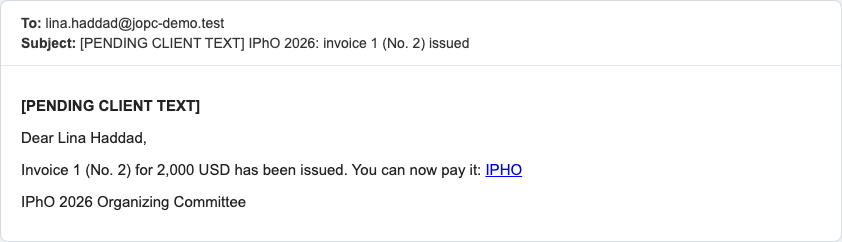
| Invoice issued | Representative | The reviewer issues an invoice. One e-mail per invoice, with the amount. |
| Partial payment received | Representative | Finance confirms part of an invoice. Shows the amount received and the remaining amount. |
| Settlement claim | Representative | Finance sends a claim for the remaining amount, payable on arrival. |
| Payment confirmed | Representative | Finance confirms that an invoice is fully paid. |
| Payment receipt | Representative | An invoice is fully paid. Contains the receipt. |
| Tax invoice | Representative | An invoice is fully paid and the tax invoice is produced. |
| Stage reminders | Representative | Sent automatically as a stage's closing date approaches. |
E-mails about a withdrawn submission or a returned participant mention the stage end date. After that date it is for information only: the representative can still correct and resubmit what was withdrawn or returned.
Two examples: