Finance
As a finance user you follow the money: you confirm bank transfers and payments made on arrival, send settlement claims for amounts still missing, and keep the payment receipts. Online payments are confirmed automatically by the payment gateway and need nothing from you.
Your part of the cycle
- Watch the finance dashboard to see what each country owes and has paid. See Confirming payments.
- Confirm receipt of fees for invoices paid by bank transfer (in full or in part) and for invoices paid on arrival (POS terminal or cash). See Confirming payments.
- Send settlement claims when a bank transfer covered only part of an invoice, so the rest is collected on arrival. See Settlement claims.
- Keep the receipts: view, print and resend the payment receipt of every fully paid invoice. See Payment receipts.
- Other tasks: country invoices, the countries' IBANs, the claims list of the receptionist, and reports 15 and 16. See Country invoices, IBANs and reports.
Before you: the reviewer issues the invoices and the representative chooses how to pay each one: online, bank transfer (with the transfer details and receipt) or on arrival (see Payment). After you: the representative sees the invoice as paid and receives the receipt by e-mail; the receptionist collects any settlement claim when the delegation arrives (see Receptionist).
Signing in
Sign in on the administration portal with your e-mail address and password. After signing in you land on the Finance dashboard. See Getting started.
Your menu
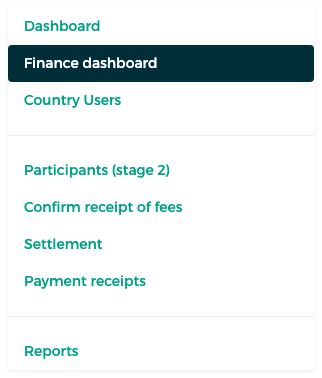
| Menu item | What you do there |
|---|---|
| Dashboard | The countries' registration progress (read only) |
| Finance dashboard | Totals, paid and remaining amounts and payment status per country |
| Country Users | The representatives, each country's invoices, and the IBANs |
| Participants (stage 2) | Look up a participant (read only) |
| Confirm receipt of fees | Confirm bank transfers and payments on arrival |
| Settlement | Send settlement claims and follow them |
| Payment receipts | All receipts, to view, print or resend |
| Reports | Reports 15 "Payment" and 16 "Payment only" |
What finance does not do
Finance does not issue invoices and does not set exemptions. These belong to the Mawhiba reviewer and the administrator.